Quotes and sign-off
Price it with a photo. Approved on their phone.
When the engineer finds extra work, you price it from the office with their photo. The owner opens a link on their own phone, puts their name to it and says yes, later or no.
The engineer finds it. You price it.
On the phone the engineer logs a finding: what they saw, how serious it is (red, amber or green), photos, and whether it is worth quoting. A finding saved without signal is sent when the phone is back in range.
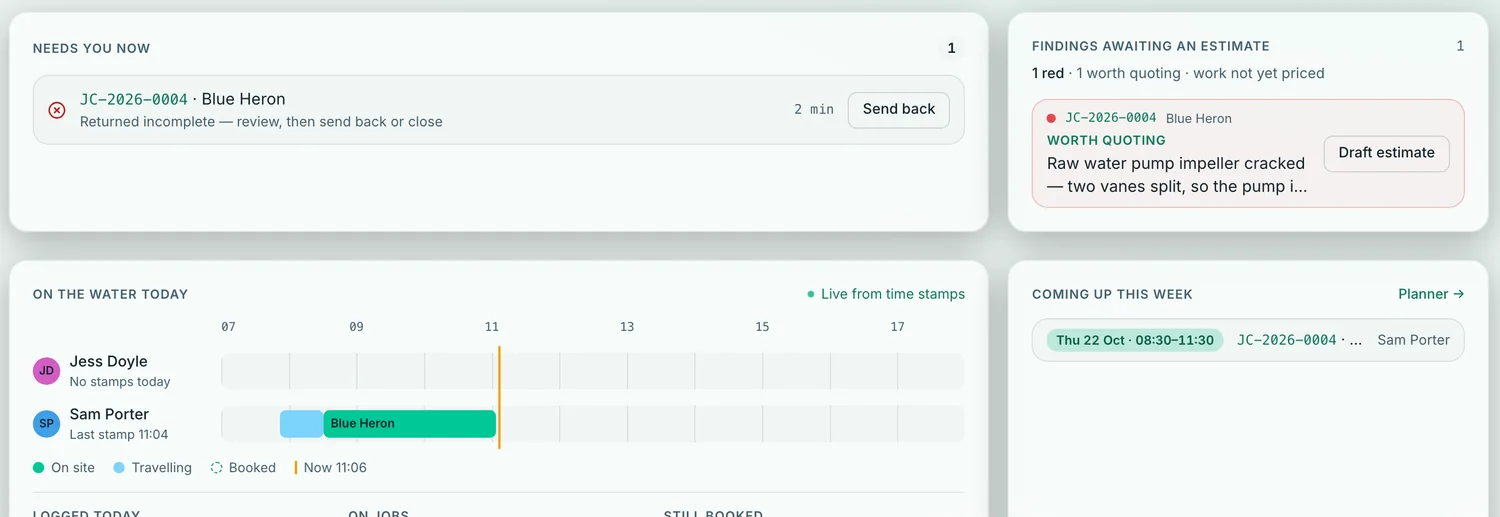
Red findings, and any flagged worth quoting, wait on your dashboard under Findings awaiting an estimate until there is an estimate out for them.
- Press Draft estimate to start the price for that job
- Or press Quote extra work from the job itself
- Only you price and send it. The engineer can’t
Swipe sideways to see the whole screen.
- 1Findings awaiting an estimate. How many are red, how many are worth quoting, and that the work isn’t priced yet.
- 2Draft estimate. Start the estimate for that job.
- 3Needs you now. Anything waiting on a decision stays at the top.
The office dashboard, as it looks in the app.
Price it in four steps.
Customer, a boat if you want one, the work, then a review. Add labour, parts or custom lines, pick from your catalogue, or copy lines from a past job.
Each estimate gets a number like QUO-2026-0017. VAT, currency and numbering are fixed at the moment you send it, so the figures can’t shift under the customer.
- Send it by email, or copy the link and send it your own way
- Valid for 30 days unless you change that
- Edit it and send again: the newer one replaces the old link
- Customer
- Boat (optional)
- Work
- Review
| Work | Type | Price |
|---|---|---|
| Replace raw water pump impeller | Labour | £154.00 |
| Water pump impeller kit | Part | £66.50 |
| VAT (20%) | £44.10 | |
| Total | £264.60 | |
The owner decides on their own phone.
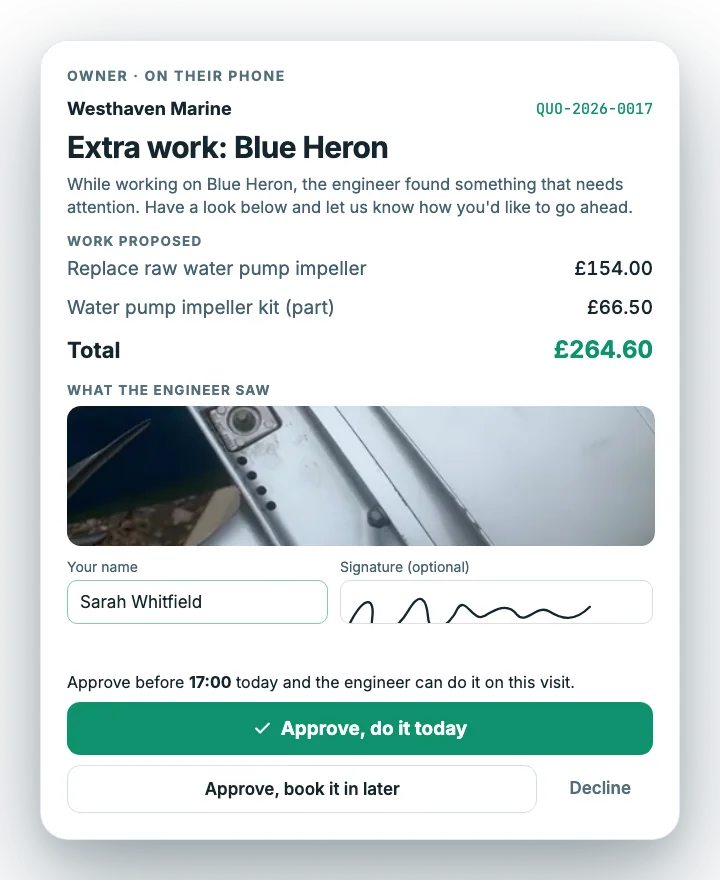
The owner opens the link on their phone or a computer. There is no account and no password. They see what the engineer found, the work and the price, and the photo from the boat.
They type their name, can draw a signature if they want to, and choose.
- Approve, do it today is only offered before the cut-off you set, while the job is still live and the work is within your same-day limit
- Approve, book it in later if it can wait for another visit
- Decline, with a reason if they want to give one
- 1Work proposed. Each line and the total, in pounds.
- 2What the engineer saw. The photo from the boat.
- 3Name and signature. A name is needed. The signature is optional.
- 4Three choices. Approve and do it today, approve and book it in later, or decline.
What the owner sees on their phone.
What happens when they say yes.
Approved for today: your labour and custom lines become steps on the job, ahead of the closing steps, and the parts are listed in an update note without their prices. The engineer is asked to accept it on their phone.
You get a chime, a message on screen, a bell item and an email. The estimate keeps its own timeline, and there is an A4 PDF with the name and signature on it.
- Sent, opened, accepted or declined, on one timeline
- A PDF with the accepted-by name and signature
- The owner’s report carries a You approved this tag and a What we noticed note. Prices are kept off the report
- !Finding logged by Sam Porter: raw water pump impeller cracked
- ➤Estimate sent to Sarah Whitfield
- ◎Opened by the owner
- ✓Accepted by Sarah Whitfield. Approved, do it today
- →Added to the job and Sam is asked to accept it
- ⏱Today’s offer ends
An example, drawn for this page.
See what’s waiting for a yes.
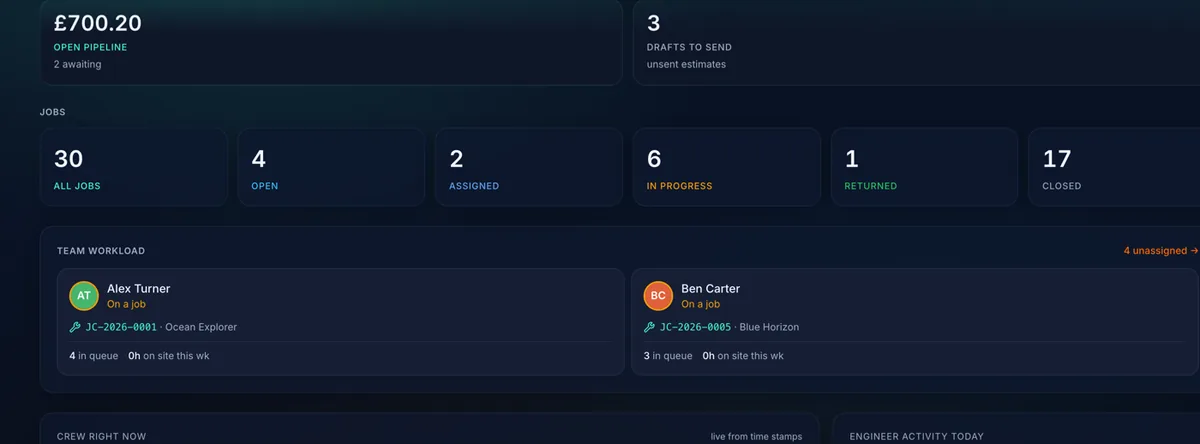
Open pipeline is the value of the estimates you have sent that are waiting for an answer, and Drafts to send are the ones you haven’t sent yet.
The quotes page adds what has been accepted, your win rate and what is about to expire, and the work-won panel follows the money from draft to sent to won to a job started.
- Estimates expiring within 7 days are flagged
- Accepted, win rate and expiring soon on the quotes page
- Press Start the job on an accepted estimate to turn it into a job card
Swipe sideways to see the whole screen.
- 1Open pipeline. What your sent estimates are worth, and how many are waiting.
- 2Drafts to send. Estimates you haven’t sent yet.
- 3Jobs by stage. Open, assigned, in progress, returned and closed.
- 4Team workload. Who is on a job, who has a queue, and the hours on site this week.
The dashboard in the app, in dark mode.
Extra work, then and now.
Extra work found mid-job
A quote the customer accepted
Questions about quotes and sign-off
Can the owner approve extra work from their phone?
Yes. You price it from the engineer’s finding and send the estimate by email, or copy the link. The owner opens it on their own phone, with no login, types their name, can add a signature, and chooses to approve it for today, book it in later or decline.
Does the engineer have to wait for the answer?
The engineer doesn’t price or send anything, so they carry on with the job. If the owner approves for today before your cut-off, the work is added to the job and the engineer is asked to accept it. Otherwise it is booked in for later.
What if the owner doesn’t answer?
An offer to do it today ends at the cut-off you set. An estimate is valid for 30 days unless you change that, and a link that has expired, or been replaced by a newer one you sent, is refused.
Does the report show the price?
No. The owner’s report shows a You approved this tag and a What we noticed note. Prices are kept off the report, the PDF checklist and the engineer’s steps.
Does KeelSync Service do invoicing?
No. KeelSync Service doesn’t do invoicing or accounting, it has no link to Xero, Sage or QuickBooks, and it doesn’t take payments or deposits. It records what was priced, what was approved and who approved it.
Get a yes before the job’s done.
Two months free, no card. Setup included. Sign up with your work email and the app walks you through your company, your team and your first job.